
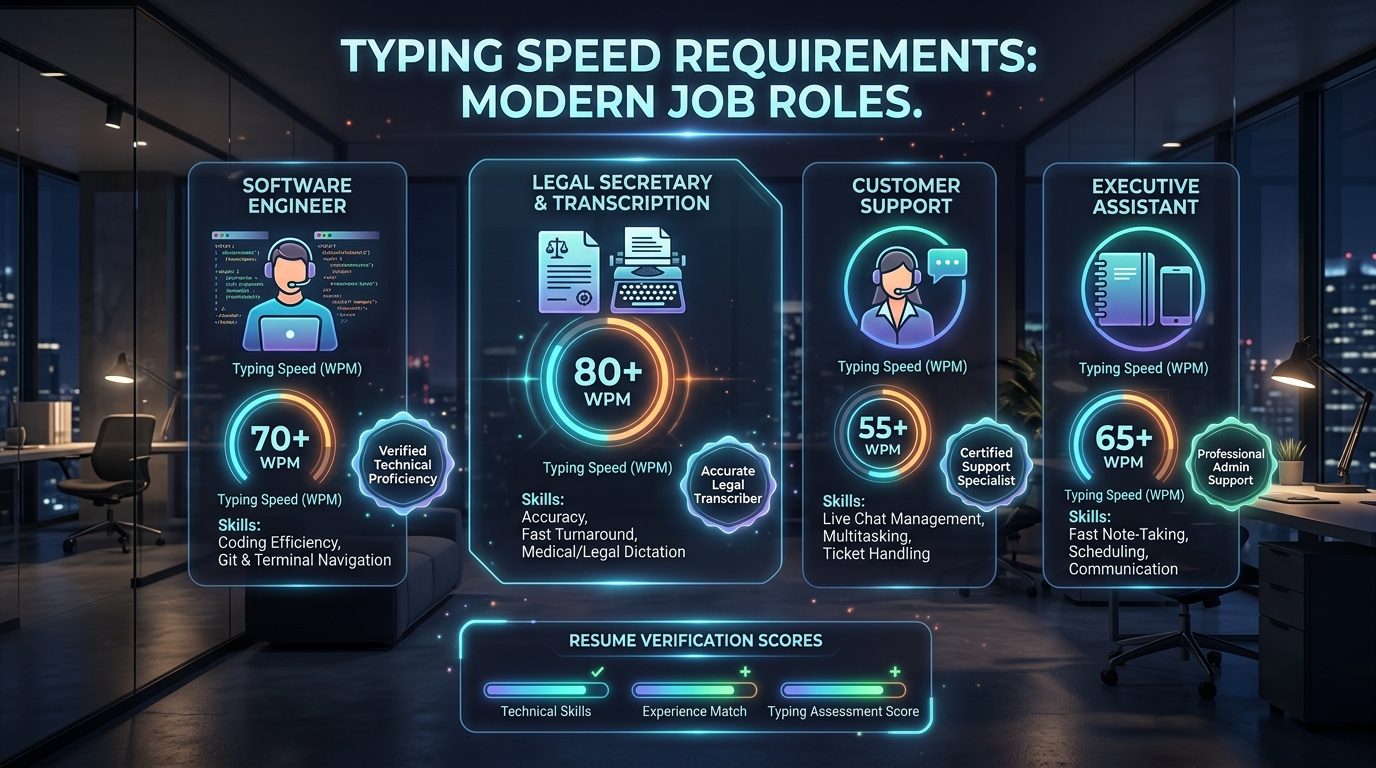
Quick Decision Rule: Only put typing speed on your resume if you type 60+ Net WPM with at least 97% accuracy, or if the employer's job description specifically lists a minimum typing speed requirement. Never list a Gross score without accuracy.
When to Include Typing Speed on Your Resume
Hiring recruiters spend an average of six seconds scanning a candidate's resume before making an initial categorization. Including irrelevant or mediocre metrics dilutes high-impact achievements. However, for positions where keyboard throughput directly translates to billable volume or customer responsiveness, your Words Per Minute (WPM) score can serve as a decisive competitive differentiator.
Target Careers Where WPM Is Strongly Recommended:
- Medical Scribing & Clinical Transcription: High patient throughput mandates rapid, error-free documentation of physician observations (Benchmark: 70–90 WPM).
- Legal Secretary & Paralegal Support: Deposition transcription and brief preparation require rapid touch typing (Benchmark: 65–85 WPM).
- Data Entry Specialist: High-volume numerical and alphanumeric ingestion (Benchmark: 60–80 WPM, 10-Key 8,000+ KPH).
- Customer Experience & Live Chat Agent: Managing 3 to 4 concurrent client chats demands continuous 55–70 WPM throughput.
- Executive Assistant & Dispatch Operator: Real-time meeting minutes transcription and rapid emergency dispatch (Benchmark: 55–75 WPM).
When to Omit Typing Speed:
Do NOT include typing speed on resumes for senior software engineering, marketing management, accounting, or executive leadership roles unless explicitly requested. In technical and management disciplines, recruiters assume standard computer literacy, and listing a modest 45 WPM score may inadvertently make you appear junior or focused on clerical tasks rather than high-level strategic problem-solving.
The Golden Rules of Formatting WPM on a Resume
1. Always Pair Speed with Accuracy
Recruiters care far more about usable work product than reckless finger speed. Writing "85 WPM" without context can lead a hiring manager to wonder if half those words contained typos that required proofreading. Always write: "85 Net WPM (99% Accuracy)".
2. Specify "Net WPM" Rather Than "Gross WPM"
Gross WPM represents raw physical keystrokes regardless of mistakes. Net WPM subtracts error deductions according to international Intersteno standards. Professional HR recruiters respect candidates who specify "Net WPM" because it proves fluency with formal testing conventions.
3. Quantify Impact in Experience Bullet Points
Rather than merely sticking a number into a generic skills list, embed your typing capability into an outcome-driven accomplishment bullet point:
Before (Weak):
• Fast typist with good computer skills.
After (Strong & Impactful):
• Transcribed 15+ hours of multi-speaker legal depositions weekly, maintaining an independently verified 82 Net WPM throughput with 99.2% transcription accuracy.
Where to Place Typing Speed on Your Resume
Option A: In Your Technical & Professional Skills Section
Ideal for administrative, medical, and data-focused resumes:
Technical Skills: Salesforce CRM, Microsoft Office Suite, Epic EMR, Google Workspace
Key Competencies: Touch Typing (75 Net WPM, 98% Accuracy), 10-Key Data Entry (9,500 KPH), Medical Terminology
Option B: In a Dedicated "Certifications" Section
If you have earned a proctored certificate or an independently verified assessment badge from an accredited platform:
Certifications & Assessments:
• Advanced Typing Speed Certification: 84 Net WPM / 99.1% Accuracy – Typer Beast Assessment Suite (Verified March 2026)
• Kenexa Prove It Data Entry Master Badge – Score: 98th Percentile
Industry WPM Hiring Tiers (Where Do You Stand?)
Compare your current score on our 60-second typing test against employer expectation brackets:
| WPM Range | Proficiency Tier | Resume Recommendation | Suitable Occupations |
|---|---|---|---|
| Under 45 WPM | Below Average | Do Not List | General office, entry level (needs practice) |
| 45 – 59 WPM | Standard Average | List Only If Required | General clerk, receptionist, warehouse admin |
| 60 – 74 WPM | Above Average (Top 25%) | Strong Candidate Asset | Executive assistant, paralegal, support rep |
| 75 – 89 WPM | High Proficiency (Top 10%) | Major Highlight | Medical transcription, legal secretary, coder |
| 90+ WPM | Elite Tier (Top 2%) | Exceptional Competitive Edge | Live captioner, court clerk, rapid data analyst |
How to Prepare Before an Interview Typing Test
If your resume lists a high typing speed, you must be prepared to replicate that performance during pre-employment testing. Here is how to prepare:
- Practice with Varied Text Content: Don't just practice common vocabulary. Practice text containing numbers, capital letters, and medical or business terminology.
- Simulate Test Pressure: Use our Pre-Employment Typing Test Guide to understand the interface and timing of systems like Kenexa and Criteria Corp.
- Check Your Percentile Standing: Review our comprehensive Typing Speed Percentile Chart to see where your WPM ranks against millions of test-takers globally.
Frequently Asked Questions
Does 50 WPM look good on a resume?
50 WPM is slightly above the national average (around 41 WPM). For entry-level receptionist or general office roles, it satisfies basic screening criteria. However, for specialized transcription or high-volume data roles requiring 65+ WPM, 50 WPM will be viewed as uncompetitive.
What is 10-Key speed and should I list it?
10-Key refers to the numeric keypad on the right side of a standard keyboard, measured in Keystrokes Per Hour (KPH). Standard proficiency is 8,000 KPH with 98% accuracy. For accounting clerks, bookkeepers, and billing coordinators, listing 10-Key speed alongside alphanumeric WPM is highly recommended.