
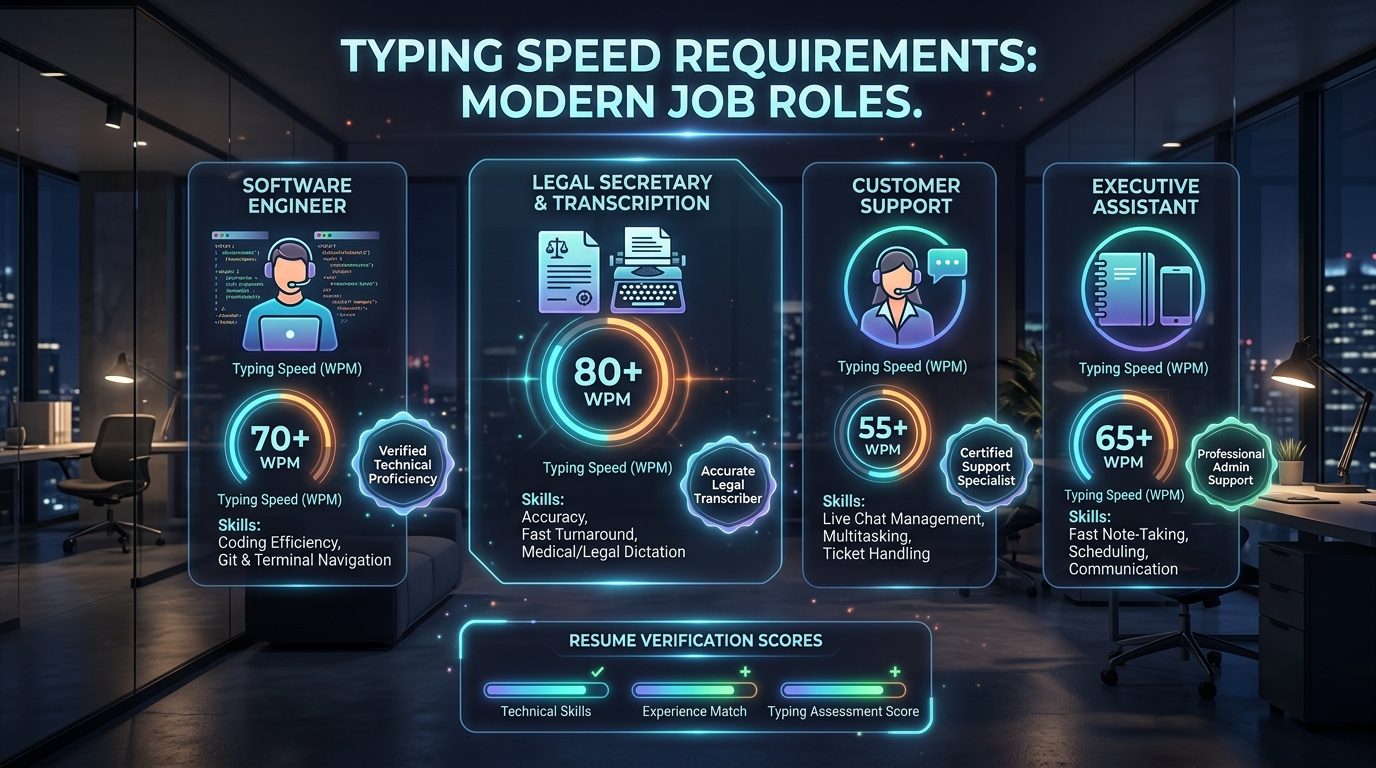
Executive Summary: Pre-employment typing evaluations are standard screening filters for over 45% of remote administrative, customer experience, legal, and healthcare job requisitions. Unlike casual typing speed tests, employment tests strictly penalize uncorrected errors, enforce strict time windows (typically 3 or 5 minutes), and frequently test numerical and punctuation endurance.
Why Employers Administer Typing Assessments
In modern corporate and governmental workflows, keyboard throughput directly dictates operational productivity. An employee typing at 35 Words Per Minute (WPM) takes over 4 hours to draft 8,000 words of correspondence, data entry entries, or incident reports. In contrast, an operator typing at 70 WPM completes the identical volume in under 2 hours, effectively doubling labor capital efficiency and reducing document turnaround latency.
Major testing vendors—including Kenexa Prove It, eSkill, Criteria Corp (Umetrix), Wonderlic, and SHL—design typing tests to measure three distinct competencies:
- Gross Keystroke Speed (Raw Throughput): Total physiological finger speed measured in characters per minute divided by 5.
- Net Precision (Usable Speed): Final output after subtracting uncorrected errors and backspace penalties.
- Sustained Rhythm Under Cognitive Stress: Ability to maintain keystroke cadence across 3-minute, 5-minute, and 10-minute continuous text passages without fatigue-induced accuracy drop-offs.
Industry-Specific Passing Benchmarks (WPM Requirements)
The table below summarizes minimum hiring thresholds across government, private sector, and specialized technical professions based on aggregated workforce telemetry data:
| Job Function / Title | Minimum Net WPM | Target Competitive WPM | Minimum Accuracy | Common Test Duration |
|---|---|---|---|---|
| General Data Entry Clerk | 45 WPM | 60+ WPM | 98.0% | 5 Minutes |
| Customer Support Representative (Live Chat) | 50 WPM | 65+ WPM | 95.0% | 3 Minutes |
| Medical Transcriptionist / Scribe | 65 WPM | 80+ WPM | 99.0% | 5 Minutes (Audio Transcribe) |
| Paralegal & Legal Secretary | 60 WPM | 75+ WPM | 98.5% | 5 Minutes |
| 911 Emergency Dispatcher | 45 WPM | 60+ WPM | 98.0% | Criticall Assessment (Audio/Data) |
| Civil Service Administrative Assistant | 40 WPM | 55+ WPM | 95.0% | 5 Minutes (State Proctored) |
| Executive Assistant / Office Manager | 55 WPM | 70+ WPM | 97.0% | 3 Minutes |
| Software Engineer / Technical Writer | 50 WPM | 70+ WPM | 95.0% | Code Syntax / Markdown |
How Pre-Employment Tests Calculate Your Score: The Math Behind the Grade
Casual online typing games frequently report "Gross WPM" or offer lenient backspace mechanics. Employment test platforms adhere to rigorous international measurement standards defined by the Intersteno Federation:
Standard Employment Net WPM Formula
Gross WPM = (Total Keystrokes Input / 5) / Elapsed Test Time in Minutes
Net WPM = Gross WPM - (Uncorrected Errors / Elapsed Test Time in Minutes)
Consider a candidate taking a 5-minute employment test who produces 1,500 total keystrokes with 6 uncorrected errors:
- Step 1: Gross Words: 1,500 keystrokes ÷ 5 = 300 words.
- Step 2: Gross WPM: 300 words ÷ 5 minutes = 60.0 Gross WPM.
- Step 3: Error Penalty: 6 errors ÷ 5 minutes = 1.2 WPM deduction.
- Step 4: Final Net Score: 60.0 - 1.2 = 58.8 Net WPM (Accuracy: 98.0%).
Notice the impact of errors: In tests with harsher penalization (such as Criticall or California State Civil Service), each uncorrected error can penalize candidate scores by 2 to 5 full words, or trigger automatic failure if accuracy dips below 95%.
The Major Testing Software Platforms You Will Encounter
Depending on whether you apply through a corporate recruiting agency or a direct enterprise portal, you will encounter one of these major testing frameworks:
1. Kenexa Prove It (IBM Skills Assessment)
Widely utilized by Fortune 500 recruiting agencies (e.g., Robert Half, Adecco, Randstad). It displays a split-screen interface: reference text above, typing input area below. Auto-scroll is automated. Backspace is typically allowed to correct words within the current line, but backtracking to previous lines is disabled.
2. Criteria Corp (Umetrix / Criteria Basic Skills Test)
Focuses heavily on general cognitive and clerical aptitude. Typing prompts include diverse punctuation, capitalizations, and technical vocabulary. You receive a percentile ranking comparing your raw Net WPM against thousands of nationwide applicants.
3. eSkill Typing Evaluation
Allows employers to customize testing modules. Can include 10-Key numerical keypad data entry, legal terminology, or medical vocabulary. Highly sensitive to casing and symbol accuracy.
4. Criticall (Public Safety & 911 Dispatch)
Simulates real-time multi-tasking emergency dispatch. Candidates must listen to dispatch audio through headphones while simultaneously typing addresses, vehicle license numbers, and emergency codes into structured database fields.
7 Proven Strategies to Pass Your Employment Typing Test
1. Prioritize Accuracy Over Velocity (The 98% Rule)
Speed without accuracy is an instant disqualifier on recruitment portals. Correcting an error requires at least three keystrokes (stopping, pressing Backspace, and striking the correct key), destroying rhythmic muscle memory. Aim for 98% accuracy first; velocity will follow naturally.
2. Master the "Eyes Ahead" Look-Ahead Cadence
Elite touch typists read 2 to 4 words ahead of the word their fingers are actively typing. By buffering visual tokens in working memory, your fingers execute keystrokes fluidly without stuttering between unfamiliar words.
3. Practice with Rigid 3-Minute and 5-Minute Timers
60-second sprints (common on social typing platforms) reward adrenaline bursts that cannot be sustained over an official 5-minute employment examination. Practice daily with our 60s and 120s modes on Typer Beast and graduate to 5-minute uninterrupted blocks.
4. Warm Up Your Fingers 15 Minutes Before the Test
Never take a pre-employment test "cold." Cold finger tendons have significantly slower latency and higher jitter. Complete 10 to 15 minutes of relaxed alphabet drills, home-row warming exercises, and capitalization drills before logging into the proctored test environment.
5. Calibrate Your Ergonomic Posture
Set your chair height so your forearms rest parallel to your desk surface with elbows bent at 90 to 100 degrees. Keep your feet flat on the floor and elevate your wrists slightly off the desk edge to prevent median nerve compression.
6. Check Your Hardware and Rollover Capability
If taking a remote assessment, test your keyboard's key registration beforehand using our Interactive Keyboard Tester. Ensure no keys suffer from chattering, double-typing, or sticky switches that could introduce phantom errors.
7. Read the Instructions on Backspacing Carefully
Some platforms disable the Backspace key entirely, while others permit corrections within the current active word. Read the candidate orientation screen thoroughly before pressing "Start."
Frequently Asked Questions (FAQ)
What is considered a good typing speed on a job resume?
For office workers and project coordinators, 60 to 75 WPM is considered strong and demonstrates above-average digital dexterity. Speeds exceeding 80 WPM qualify as elite and should be highlighted on resumes for executive assistant, transcription, or coding positions. Learn more in our Typing Speed for Jobs Guide.
Do government civil service typing tests allow spell-check?
No. Civil service and state agency typing tests strictly disable spell-checking, autocorrect, and dictionary prediction. Candidates must type verbatim text exactly as presented, including capitalizations, hyphenations, and punctuation marks.
How long does it take to increase typing speed from 40 to 60 WPM?
With 20 minutes of daily deliberate touch-typing practice focusing on home-row discipline and zero glance-downs, most adults achieve a 20 WPM increase within 4 to 6 weeks. See our step-by-step roadmap in How Long Does It Take to Reach 80 WPM?.